
Last updated:

Quick answer
No single rule, but a range: Daktronics is the most conservative at 1 inch of digit height per 25 feet, Masterclock the most generous at 1 inch per 50 feet for a viewer who stops and concentrates, halved for a casual glance, and Q-lite and the Broadcom datasheets sit close together between them. The numbers do not contradict each other; they describe different points on one scale, from readable with effort to readable at a glance. Decide which of those your user is, pick a height from the matching column, then confirm it with a sample.
There is no single formula. Published rules of thumb range from about 1 inch of character height per 25 feet of viewing distance (Daktronics) to 1 inch per 50 feet as a maximum (Masterclock), and Broadcom rates its 0.56″ 7-segment displays for up to 7 m. Pick a height from that range, then confirm it with a sample.
This guide puts the published rules side by side, converts them into one quick-reference table for common 7-segment digit heights, and explains how to apply them to dot matrix displays. Every multiplier below comes from a named public source, listed with links at the end.
Table of Contents
Why do sources give different viewing distances?
Each source answers a slightly different question. Some describe the maximum distance at which an attentive viewer can still read a digit; others describe a comfortable distance for a passer-by. Masterclock states this directly: its maximum distances assume the viewer stops and concentrates, and for a quick, casual glance the estimates should be cut in half. Component datasheets such as Broadcom’s give a single “designed for viewing distances up to” figure per part, while sign standards such as the ADA set minimum letter heights for static signs, not for LEDs.
So the numbers do not contradict each other as much as they look. They sit at different points on the same scale, from “readable if you look carefully” to “readable at a glance”.
How do the published rules of thumb compare?
| Source | Type | Rule as published | Same rule in metric | What it describes |
|---|---|---|---|---|
| Daktronics | LED sign maker, knowledge base | At least 1 in of text height for every 25 ft of viewing distance | 1 in : 7.6 m | Minimum text height for a given distance |
| Masterclock | LED clock maker, application article | Increase digit size 1 in for every 50 ft of viewing distance | 1 in : 15 m | Maximum distance for a viewer who stops and concentrates; halve it for a casual glance |
| Q-lite | LED display maker, layout guideline | Height in cm x 5 = reading distance in m | 1 in : 12.7 m | Minimum text size for graphic LED displays |
| Broadcom datasheets | Component datasheets | 0.3″ up to 3 m; 0.56″ up to 7 m; 0.8″ up to 10 m | About 1 in : 12.5 m | Per-part rating (“designed for viewing distances up to”) |
Daktronics is the most conservative of the four; Masterclock’s maximum is the most generous. Q-lite and the Broadcom datasheets land close to each other in the middle.
Quick-reference table: what viewing distance suits each 7-segment digit height?
The table applies each source’s own rule to digit heights that appear in our 7-segment LED display range. The Daktronics and Q-lite columns are arithmetic from their published rules; the Broadcom column shows only figures printed in its datasheets. The last column links one example part at each height, with its datasheet and drawing.
| Digit height | Daktronics rule (1 in : 25 ft) | Q-lite rule (cm x 5 = m) | Broadcom datasheet (up to) | OPTO PLUS example part |
|---|---|---|---|---|
| 0.2″ (5.08 mm) | 5 ft / 1.5 m | 2.5 m | – | OPS-S2010(1) |
| 0.3″ (7.62 mm) | 7.5 ft / 2.3 m | 3.8 m | 3 m (10 ft) | OPD-S3010(1) |
| 0.56″ (14.2 mm) | 14 ft / 4.3 m | 7.1 m | 7 m (23 ft) | OPD-S5620(1) |
| 0.8″ (20.3 mm) | 20 ft / 6.1 m | 10.2 m | 10 m (33 ft) | OPD-S8022(3) |
| 1″ (25.4 mm) | 25 ft / 7.6 m | 12.7 m | – | OPD-S10012(3) |
| 2.3″ (58.4 mm) | 57.5 ft / 17.5 m | 29.2 m | – | OPD-S23010(1) |
| 4″ (101.6 mm) | 100 ft / 30.5 m | 50.8 m | – | OPD-S40010(1) |
| 5″ (127 mm) | 125 ft / 38.1 m | 63.5 m | – | OPD-S50012(3) |
The distances in this table are calculated from third-party rules of thumb, not measured on OPTO PLUS LED products. Brightness, color, viewing angle and ambient light all move the real number. mm values are converted from inches; actual digit height follows the datasheet, e.g. 56.80 mm for our 2.3″ S23010LE.
How does Masterclock’s table split maximum and casual viewing?
Masterclock publishes its own table with two columns, one for a viewer who stops to read and one for a typical viewer. The figures below are reproduced as published, without recalculation.
| Digit height | Maximum viewing distance | Typical viewing distance |
|---|---|---|
| 0.6 in | 30 ft (9 m) | 15 ft (5 m) |
| 1 in | 50 ft (15 m) | 30 ft (10 m) |
| 2.3 in | 100 ft (30 m) | 50 ft (15 m) |
| 4 in | 200 ft (60 m) | 100 ft (30 m) |
| 7 in | 350 ft (100 m) | 175 ft (50 m) |
Source: Masterclock, Visibility of LED Digital Clock Displays.
How do the rules apply to dot matrix displays?
Use the height of the lit character, not the size of a single dot. On a 5×7 dot matrix, a full-height character uses all seven rows, so the character height is close to the matrix height. Our dot matrix displays list matrix height in the product name: for example, the 1.9 mm-dot 5×7 models (OPD-M25710(1), OPD-M25712(3)) have a 0.67″ matrix height and the 10 mm-dot 5×7 model (OPD-M105710(1)) has a 4″ matrix height. Apply the rules above to that height.
Two variables matter separately. Dot diameter governs viewing distance; matrix size governs how complete each character looks. A 5×7 matrix is enough for Latin characters, while Chinese or Japanese characters generally need 16×16 or more, so a large-dot 5×7 module reads from far away but cannot show those scripts. For how matrix names and structures work, see our dot matrix display guide.
What else changes the readable distance?
Character height is the starting point, but viewing angle, ambient light and how height is defined can all move the real readable distance.
Why does viewing angle change the size you need?
The same digit reads very differently head-on versus off-axis. If people will see the display from the side, from below or while walking past, move up a size from the table.
How do ambient light and contrast affect readability?
A digit that is easy to read indoors can wash out in daylight. A filter or light pipe in front of the display also lowers effective contrast, so judge readability with the filter in place, not on a bare part.
Does character height mean the lit segment or the whole package?
In a datasheet, character height means the height of the lit segments, not the outline of the part. Size the bezel opening from the segment dimension. If you are unsure which line of the datasheet to read, see how to read an LED specification table.
How do you choose a digit height in four steps?
Order matters: settle the viewing situation before you look at part numbers.
- Measure the farthest viewing distance and decide whether people will stop and read or only glance.
- Pick a candidate height from the tables. For a glance, start from the conservative Daktronics column or Masterclock’s typical column; for an operator who stands and reads, the Q-lite or Broadcom figures are reasonable.
- Check the mechanical envelope. In our standard range, SMD 7-segment displays (part numbers starting OPS) go up to 0.8″, for example OPS-Q8012(3); Super Thin SMD models (STT in the part number) go up to 0.7″, for example OPS-S7012(3)xx-STT(R)-1.5-G(B)W; heights from 1.0″ to 5.0″ are single-digit through-hole parts, with part numbers starting OPD-S.
- Confirm with a physical sample at the real angle, under the real light, behind the real filter.
Our advice: when two heights both seem to fit, compare samples of both side by side at the real distance. In practice, that ten-minute check settles more questions than any table.
Which OPTO PLUS LED digit heights can you choose from?
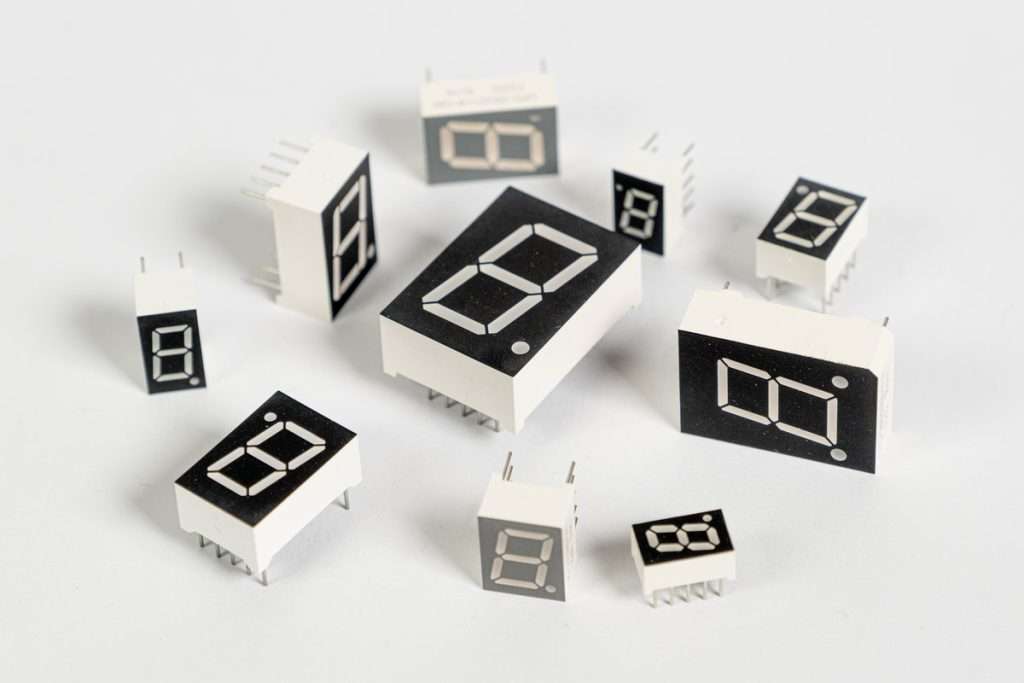
Our 7-segment display range covers digit heights from 0.2″ to 5.0″ across 154 models. Large single-digit through-hole examples include the 1″ OPD-S10012(3), 2.3″ OPD-S23010(1), 4″ OPD-S40010(1) and 5″ OPD-S50012(3). Our dot matrix range has 26 models with dot diameters from 1.9 mm to 10 mm.
Common mistakes when choosing a digit height
These are the mistakes we see most often when a digit height is fixed too early. Checking them once can save a round of samples.
- Settling on one rule of thumb. The published sources differ by a factor of two or more for the same distance, so a single formula is a starting point, not a decision.
- Only counting the straight-on distance. Side viewing, bright ambient light and a tinted window all cut the readable distance and call for the next size up.
- Picking the digit height before the enclosure. A larger digit means a larger module and a larger cutout, and the mechanical change comes back to you after the PCB is laid out.
- Applying the 7-segment formula to a dot matrix. A character on a matrix is built from dots, so the same nominal height reads at a shorter distance.
- Not comparing two sizes in the real housing. Two samples behind the actual window settle the question faster than any table.
Sources
- Daktronics, LED Displays: How to Determine Optimal Viewing Distance?
- Masterclock, Visibility of LED Digital Clock Displays
- Q-lite, Layout guidelines for graphic LED displays
- Broadcom datasheets: 7.6 mm (0.3″) displays, 14.2 mm (0.56″) displays, 20 mm (0.8″) displays
- U.S. Access Board, 2010 ADA Standards for Accessible Design, section 703.5.5
FAQ
Before you decide
By this point you should be holding a range of digit heights rather than a single number. What settles it is three things the tables cannot know: where the display is mounted, who is reading it, and how bright the surroundings are.
Outdoors or under strong ambient light, lean toward the taller end of the range. Indoors, where the viewer stops to read, the shorter end saves cost and board space. Whatever the arithmetic says, mount a sample at the real position and look at it in the worst light you expect. That one check is worth more than any rule of thumb.
Broadcom’s datasheet rates its 0.56″ (14.2 mm) displays for viewing distances up to 7 m. The more conservative Daktronics rule gives about 4.3 m (14 ft), and the Q-lite rule gives about 7.1 m. Use the lower figure if viewers only glance at the display.
Depending on the rule: about 0.8″ by the Q-lite rule and the Broadcom 0.8″ datasheet, about 1.3″ by the Daktronics rule, and about 0.7″ by Masterclock’s maximum-distance rule. Our 7-segment range includes 0.7″ (OPS-S7012(3) Super Thin), 0.8″ (OPD-S8022(3)), 1″ (OPD-S10012(3)), 1.2″ (OPD-S12012(3)) and 1.5″ (OPD-S15012(3)) digits; confirm the final choice with a sample.
No. Character height is the height of the lit segments, and the package is taller than that. Size your bezel opening from the segment dimension in the datasheet, not from the overall part outline, or the opening will be larger than the digit. More answers like this are on our Q&A page.
Only as a cross-check. Section 703.5.5 of the 2010 ADA Standards sets minimum character heights for static visual signs based on mounting height and viewing distance (for example, 2 in minimum for characters mounted 70 to 120 in above the floor and viewed from less than 15 ft). It is not written for self-lit LED digits.
Yes. Tell OPLED (展躍光電) the farthest viewing distance, the viewing angle, the ambient light and the space available in your panel, and we will suggest candidate heights from the standard range. A sample in the real product is still the final check, so plan to confirm with one. Send your requirements here.
Related articles
These articles continue the same topic and are worth reading together.
References
- Daktronics Knowledge Base, article 000030569
- Masterclock, Visibility of LED Digital Clock Displays
- Q-lite, Layout Guidelines for Graphic LED Displays
- Broadcom datasheet AV02-1107EN
- Broadcom datasheet AV02-2553EN (7.6 mm / 0.3″ displays)
- Broadcom datasheet AV02-2551EN (20 mm / 0.8″ displays)
- U.S. Access Board, 2010 ADA Standards for Accessible Design
What should you prepare before requesting a quote?
Send us these details and we can quote a standard part or a custom 7-segment display in one pass:
- Digit count and layout: single, dual, triple or quad digit, with or without decimal point or colon
- Character height (for example 0.36″, 0.56″, 0.8″, 1.0″) or the viewing distance you need to cover
- Color, and whether you need a specific wavelength or brightness bin
- Common anode or common cathode
- Brightness target (mcd) and ambient light: indoor, outdoor or dashboard
- Drive method: static or multiplexed, and the driver IC you plan to use
- Package: SMD or THT (through-hole), and any PCB footprint or height limits
- Quantity: prototype, pilot run or annual volume
- Target application and operating temperature range
Send the list through our contact page and our sales team will reply with a matching standard part or a custom proposal.