
Last updated:

Quick answer
Consumer electronics is where an LED display is hardest to notice and easiest to get wrong: it has to stay readable, stay cheap, and still match the styling of the product. Examples include clocks, bluetooth speakers, air quality monitors, gaming headphones, and theater sound systems. This analysis series aims to help product designers understand display applications and cost-effective choices.

Table of Contents
Which 10 consumer electronics LED display applications are covered in #36-45?
This article is an article in the “100 LED display application analysis for product designers” series written by OPTO PLUS LED Corp., an article in the classification of consumer electronics, the article will analyze the public information of various products containing LED display applications on the network, so that product designers can quickly understand what kind of effect LED display products can do in the product, and can choose the display application with the lowest cost and the most suitable product type in the product design.
- Product Designer’s 100 LED Display Application Analysis | home appliances(1) #1~10
- Product Designer’s 100 LED Display Application Analysis | home appliances(2) #11~25
- Product Designer’s 100 LED Display Application Analysis | home appliances(3) #26~35
- Product Designer’s 100 LED Display Application Analysis | Consumer Electronics(1) #36~45
- Product Designer’s 100 LED Display Application Analysis | Consumer Electronics(2) #46-60
- Product Designer’s 100 LED Display Application Analysis | Display product (1) #61-75
- Product Designer’s 100 LED Display Application Analysis | Game console (1) #76-85
- Product Designer’s 100 LED Display Application Analysis |Electrical Instrument1) #86-100
Consumer Electronics #36: What LED display does an indoor dot matrix clock use?
- Product application:
- To Display time
- Reference image:

- LED displays used:
- B:Emitting light to display pattern
- Use 4 set of 5*7 dot matrix Red LED display to display pattern
- B:Emitting light to display pattern
- Emitting color:
- Red
Consumer Electronics #37: How does a bluetooth speaker with electronic clock and wireless charger show time and status?
- Product application:
- To display time battery and product status
- Product page:
- Reference video:

- LED displays used:
- A – Illuminated characters
- use a 4 digit white LED 7 segment display
- C – LED indicators
- use 9 white LED icon to display product status and a battery icon to display battery power
- A – Illuminated characters
- Emitting color:
- White
Consumer Electronics #38: Which LED displays does a digital permanent calendar with clock use?
- Product application:
- display calendar ,time ,temperature and humidity
- Reference product page:
- Reference video:

- LED displays used:
- A – Illuminated characters
- use 18 Red LED 7 segment display to show all number.
- C – LED indicators
- Using 7 red emitting color icons and weekday.
- Emitting color:
- Red
Consumer Electronics #39: Does the Ticktime Pomodoro Timer use only LED displays?
- Product application:
- To display count down clock
- Reference Product page:
- Reference video:

- What LED display was used?:
- A – Illuminated characters
- Each side of the hexagon uses a seven-segment display to show the countdown time
- A – Illuminated characters
- The circular countdown box and time are not LED displays, but small LCD displays.
- Emitting color:
- White
Consumer Electronics #40: What does a wireless charger with a 7-segment display clock show besides the time?
- Product application:
- Display time and product status
- Reference product video or picture:
- Product page:
- Nedis Alarm clock with wireless charging
- Product page:
- Product page:

- LED displays used:
- A – Illuminated characters
- use a four digit white LED 7-segment display
- C – LED indicators
- use 4 icon to display product status and to LED for time colon
- wireless charging station have RGB LED for night light
- A – Illuminated characters
- Emitting color:
- White
Consumer Electronics #41: How does a wireless charger with a dot matrix display clock show the time?
- Product application:
- Display time and product status
- Product video:

- LED displays used:
- B – Illuminated graphics
- 4 5*7 dot matrix white LED display to display time and colon
- B – Illuminated graphics
- C – LED indicators
- use 3 white icon to display product status.
- Emitting color:
- White
Consumer Electronics #42: Which LED display shows the score on the AWAIR Air Quality Monitor?
- Product application:
- display Air Quality score
- Reference image:

- Product page:

- LED displays used:
- B – Illuminated graphics
- use 19*5 white color LED dot matrix display to display Air Quality score
- B – Illuminated graphics
- C – LED indicators
- use a orange / green LED to show battery status
- Emitting color:
- White/Orange/Green
Consumer Electronics #43: How does the Honeywell PM2.5 car air purifier display air quality?
- Product application:
- Display car air Quality
- Display video and picture:
- Product page:
- Honeywell PM2.5 car air purifier CATWPM25D01
- Product page:
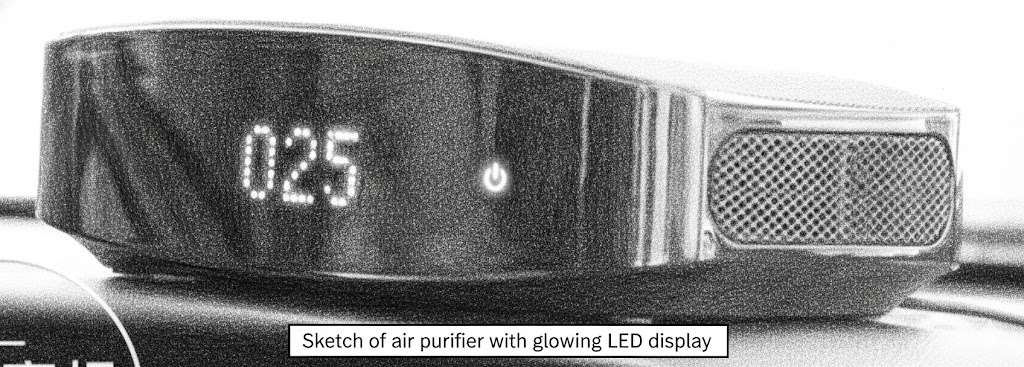
- LED displays used:
- B – Illuminated graphics
- use 3 4*7 white LED dot matrix display to show air Quality score
- B – Illuminated graphics
- Emitting color:
- White
Consumer Electronics #44: What kind of LED display lets the ROG Delta S Animate gaming headphone show patterns?
- Product application:
- display dot matrix pattern
- Reference product:
- Product page:
- LED displays used:
- B – Illuminated graphics
- use 250 white LED dot matrix to show all kind of pattern
- Emitting color:
- White

Consumer Electronics #45: Can the Sansui Round theater sound show letters as well as numbers on its LED display?
- Product application:
- Display product stasus and number
- Reference product:
- Product page:
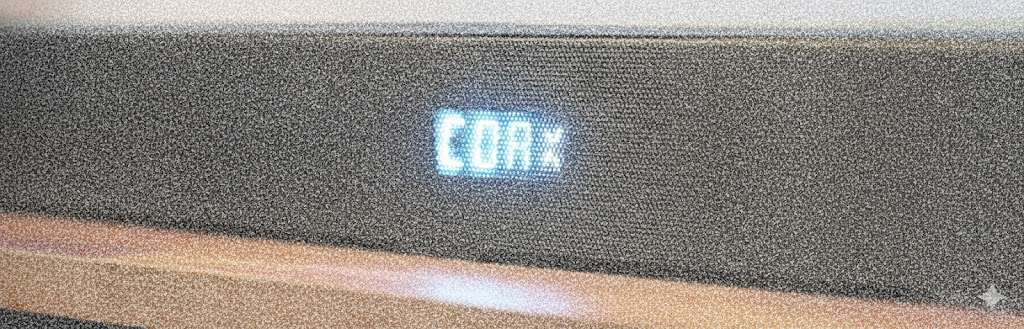
- LED displays used:
- A – Illuminated characters
- use a 4 digit alphanumic white LED display to display character and number
- Emitting color:
- White
- A – Illuminated characters
What other questions come up?
Beyond the main topic, these are the questions customers ask us most often, so the answers are collected here.
How are status icons combined with a 7-segment clock display?
Icons are placed beside the digits to show states the digits cannot, such as the date, mode or battery. The digital calendar clock in this article uses 18 red 7-segment digits for numbers, plus seven red icons and a day indicator, while the wireless-charger clock uses a four-digit white 7-segment display with four status icons and LEDs for the colon.
Does every glowing display in a product use LED technology?
No. The Ticktime Pomodoro timer (#39) shows that one product can mix technologies: each side of the hexagon uses a seven-segment LED display for the countdown time, but the circular countdown box and its time are small LCD displays, not LED. When analysing a product, check each display separately instead of assuming one technology.
FAQ
Most of the displays mentioned here map to a standard part in our catalog: 7-segment displays, alphanumeric displays and dot-matrix displays, where you can compare size, color and polarity side by side.
Entries #36-45 cover an indoor dot matrix clock, a bluetooth speaker with electronic clock and wireless charger, a digital permanent calendar clock, the Ticktime Pomodoro timer, two wireless-charger clocks (one 7-segment, one dot matrix), the AWAIR air quality monitor, a Honeywell PM2.5 car air purifier, the ROG Delta S Animate gaming headphone, and the Sansui Round theater sound.
The AWAIR Element (#42) uses a 19×5 white LED dot matrix display to show its air quality score, plus an orange/green LED for battery status. The Honeywell PM2.5 car air purifier (#43) uses three 4×7 white LED dot matrix displays to show the air quality score.
Both appear in this article: the Nedis alarm clock with wireless charging (#40) uses a four-digit white 7-segment display with 4 icons and LEDs for the time colon, plus an RGB LED night light on the charging station, while the iHome iW18 (#41) uses four 5×7 white dot matrix displays for time and colon with 3 white icons.
The ROG Delta S Animate (#44) uses 250 white LEDs as a dot matrix to show all kinds of patterns, emitting white only. Other dot matrix examples in this article are smaller modules: the indoor MRT station clock (#36) uses four 5×7 red dot matrix displays, and the AWAIR monitor (#42) a 19×5 white matrix.
A size such as 5*7 describes the dot array as columns by rows, so a 5*7 module has five columns and seven rows of LEDs. This article’s examples show how modules are combined: four 5*7 red modules form a clock pattern at a metro station, and a 19*5 white matrix shows an air-quality score. The same notation appears in the article’s other 5×7 module examples.
Related articles
These articles continue the same topic and are worth reading together.
References
The product pages we looked at for each application are listed here, so you can check the displays yourself.
- OneDer, OneDer V06 product page (#36, #37)
- KINYO, TD-290 digital permanent calendar clock (#38)
- flyingV, Ticktime Pomodoro Timer crowdfunding page (#39)
- Awair, Awair Element product page (#42)
- ASUS ROG, ROG Delta S Animate product page (#44)
- flyingV, Sansui Round theater sound crowdfunding page (#45)
Related LED Reliability and Thermal Resources
Continue with these closely related resources to verify selection, circuit, and application requirements.
- Product Designer’s 100 LED Display Application Analysis | home appliances (2) #11~25
- Common LED Display Defects: Uneven Color
- Why Custom LED Displays Are a Good LCD Replacement: Two Case Studies
- Case-study – Custom LED display and module
- LED Display Tooling Costs: How to Reduce Them
- How Dot-Matrix Displays Show Digits, Letters, and Pixel Graphics
- Compact White LED Dot-Matrix Displays | 1.9 mm Dots | Electronica 2022